1 / 28

AI for Recruiting & Staffing

Prompting and Tools for Sales, Customer Development & Productivity

60-Minute Interactive Workshop

Presented for EG Workforce Solutions

by Joe Scanlin

Warm-Up: Why This Feels Different
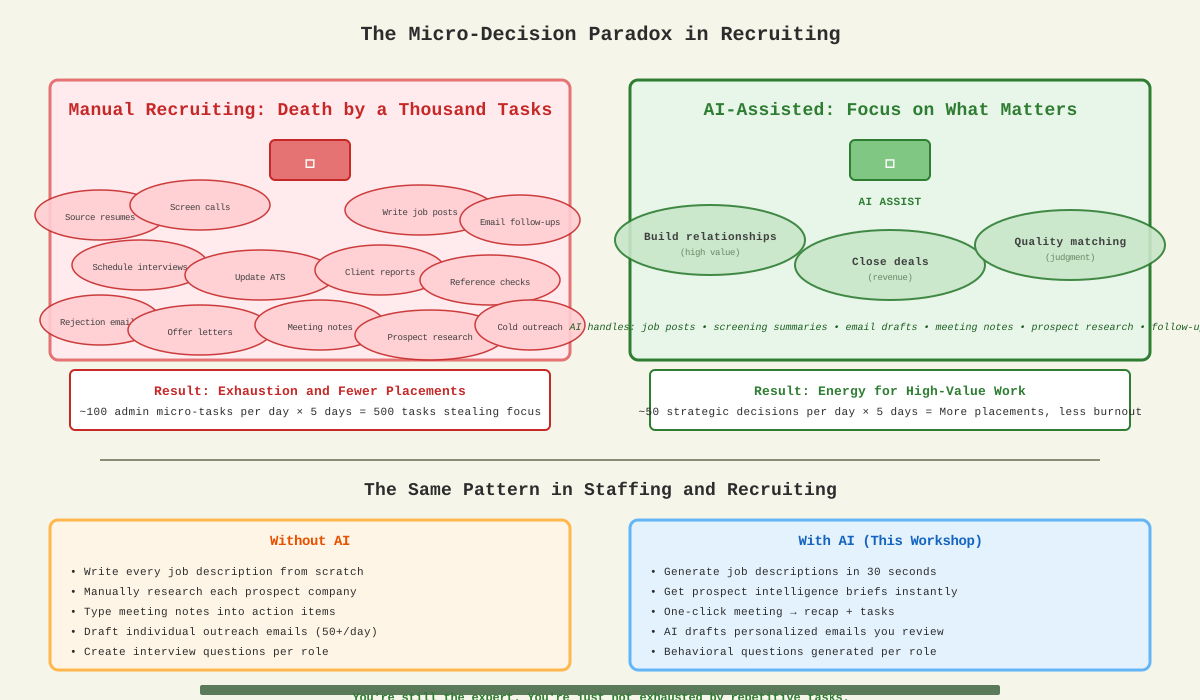
The Autonomous Driving Analogy

Autonomous driving analogy for AI-assisted recruiting work

You're still driving. You're still making the important decisions.
You're just not exhausted by the micro-decisions anymore.

90% reduction in cognitive load = Energy preserved for relationship building

0-5 min

Kickoff and Outcomes

Why AI Now for Staffing?

  • AI has moved from experimental to essential for talent teams
  • Recruiters and sales teams gain 5-15 hours per week
  • Shift from "nice to have" to competitive advantage
  • EG's mission: deliver measurably better people—AI helps scale that

Interactive Poll: Your Biggest Time Drains

  • Candidate sourcing & screening
  • Sales outreach & follow-ups
  • Client proposal writing
  • Meeting prep & notes
  • Email triage
  • Job description writing
  • Interview coordination
  • ATS data entry

By the end: You'll have prompts, patterns, and a daily routine that saves 5+ hours per week.

What is AI? A Simple Guide

Understanding the tools you'll actually use

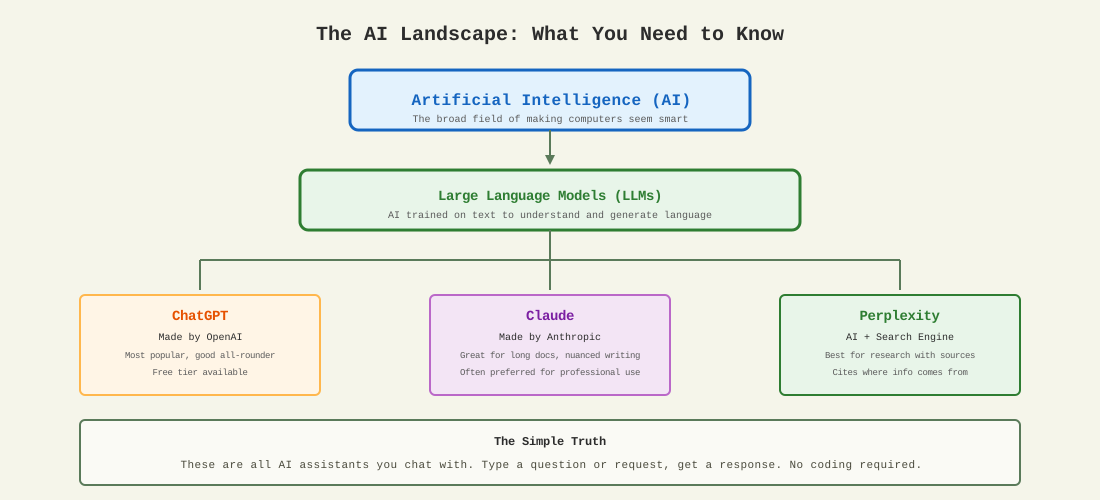
AI Landscape for non-technical users
What You Need to Know
  • ChatGPT, Claude, Gemini = AI assistants you chat with
  • They don't "think" = They predict likely responses based on patterns
  • No memory between chats = Each conversation starts fresh
  • They can be wrong = Always verify important facts
Which Tool to Use?
  • ChatGPT = Most popular, great all-rounder
  • Claude = Better for long documents, nuanced writing
  • Perplexity = Best for research (includes sources)
  • Your ATS AI features = Use what's built-in first

The Key Insight

AI is a tool, like Excel or email. It doesn't replace your expertise—it amplifies it. You provide the judgment; AI handles the repetitive work.

5-12 min

What to Use AI For (and Not For)

✓ Great Fits
  • Recruiting: Candidate sourcing, screening summaries, interview questions
  • Sales: Prospect research, outreach drafts, proposal writing
  • Client work: Job descriptions, role briefs, talent market intel
  • Personal: Daily planning, calendar/email triage, meeting recaps
⚠ Cautions
  • Confidentiality: Never paste candidate PII or client contracts
  • Compliance: Don't use AI for final hiring decisions
  • Bias: Review AI outputs for unintended screening bias
  • Verification: Always fact-check salary data and market claims

Golden Rule

Separate candidate data from AI interactions. Anonymize details before pasting.

Example: Instead of "John Smith's resume from TechCorp", use "A mid-level software engineer with 5 years experience at a Fortune 500 company."

12-15 min

What's Actually Happening?

How Large Language Models Work (Simple Version)

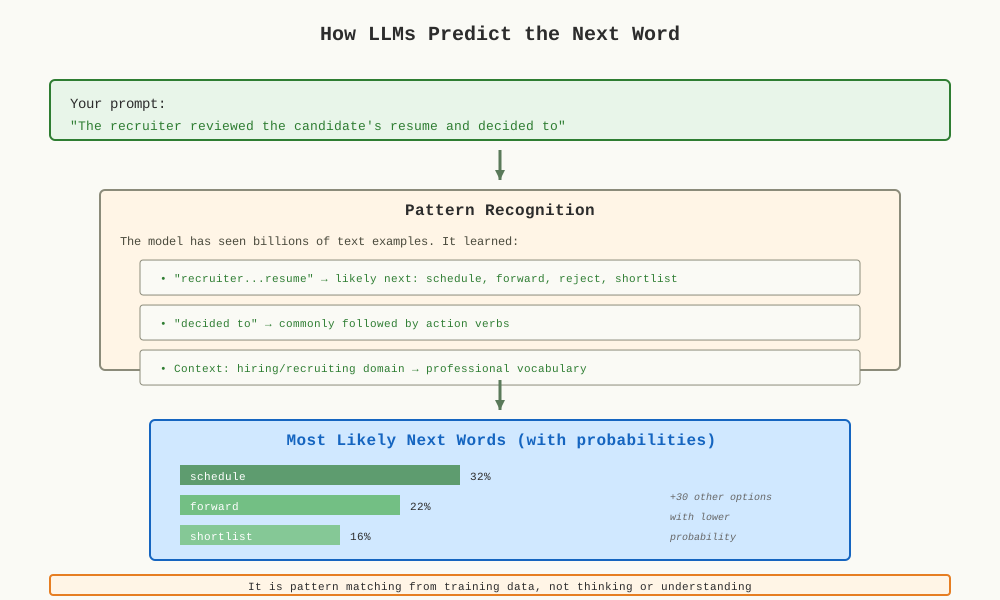
How LLMs predict the next word

Think of it Like This

An LLM is like an incredibly well-read assistant who's seen billions of examples of text and learned what words tend to follow other words in different contexts.

What It's Good At
  • Finding patterns in language
  • Completing sentences naturally
  • Matching style and tone
  • Following common structures
What It's Not
  • Not "thinking" or "understanding"
  • No actual knowledge or memory
  • Can't access your ATS data
  • Doesn't fact-check itself

Key Takeaway: LLMs are prediction engines trained on patterns. That's why good prompts matter—you're giving it better context to make better predictions.

15-28 min

Prompting That Works

The CRAFT Framework

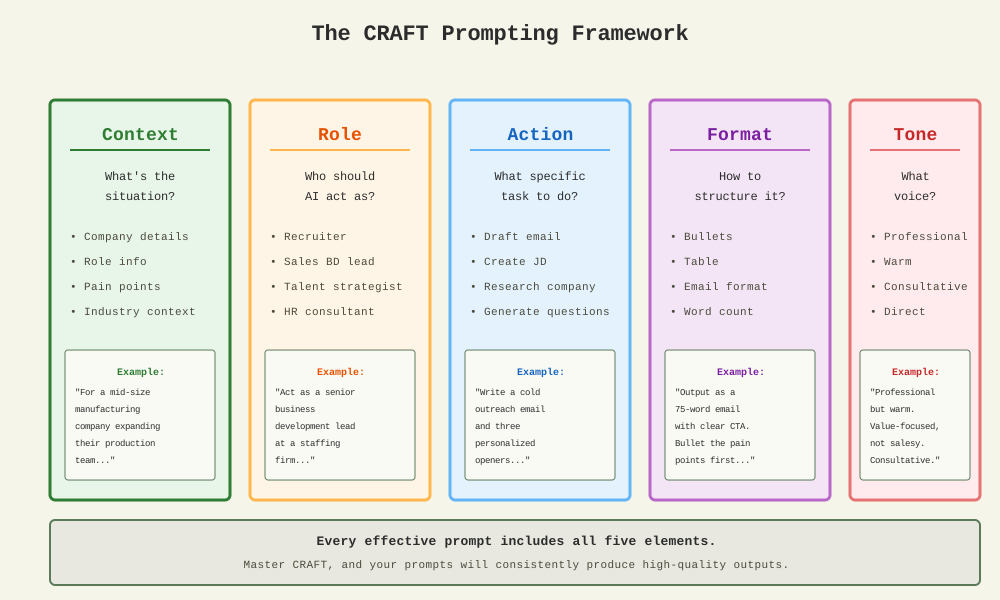
CRAFT Framework visualization

Every effective prompt includes Context, Role, Action, Format, and Tone

Example: Before CRAFT

"Help me reach out to this prospect."

After CRAFT

"Act as a senior business development lead at a staffing firm. Using the company details below, produce: 1) key pain points they likely have (3 bullets), 2) relevant EG services to pitch, 3) a 75-word personalized outreach email. Professional but warm tone."
15-28 min (cont.)

Proven Prompting Patterns

Pattern 1: Write Then Refine

Step 1: "Draft a 150-word job description from these notes: [paste]" Step 2: "Now refine it to be more inclusive, add salary range, and make it compelling for passive candidates. 200 words max."

Pattern 2: Three Options

"Give me three versions of this sales outreach email: 1) direct and brief, 2) value-focused with a case study reference, 3) insight-led with an industry trend. 50-75 words each."

Pattern 3: Request Missing Info First

"Before drafting, ask me for any missing info you need about: target company, pain points, services to pitch, desired outcome, and timeline."

Pattern 4: Compare A vs B

"Compare these two candidates using a scoring rubric: skills match (0-10), experience level (0-10), culture fit indicators (0-10), availability (0-10). Show scores in a table, then recommend one with rationale."
15-28 min (cont.)

Guardrails for Quality

Always Add These Constraints

  • Sources: "Include sources for all market claims, or say 'unknown' if unavailable"
  • Audience: "Write for a [hiring manager / C-suite exec / candidate]"
  • Length: "Keep under [150 words / 3 bullets / 1 page]"
  • Structure: "Use [bullets / table / paragraph] format"

Recruiting-Specific Self-Check

For candidate-facing content, add this line:

"Before finalizing, check: Is this inclusive language? Does it avoid bias? Is the salary range competitive based on market data?"

Example with Guardrails

"Act as a talent acquisition specialist. Create a job posting for a Production Manager role in food manufacturing. Include: key responsibilities, must-have qualifications, nice-to-haves, benefits highlights, and salary range. Use inclusive language. Output as formatted text ready for posting. Cite market salary data or note 'estimate.'"
28-38 min

Sales & Customer Development

AI for Business Growth

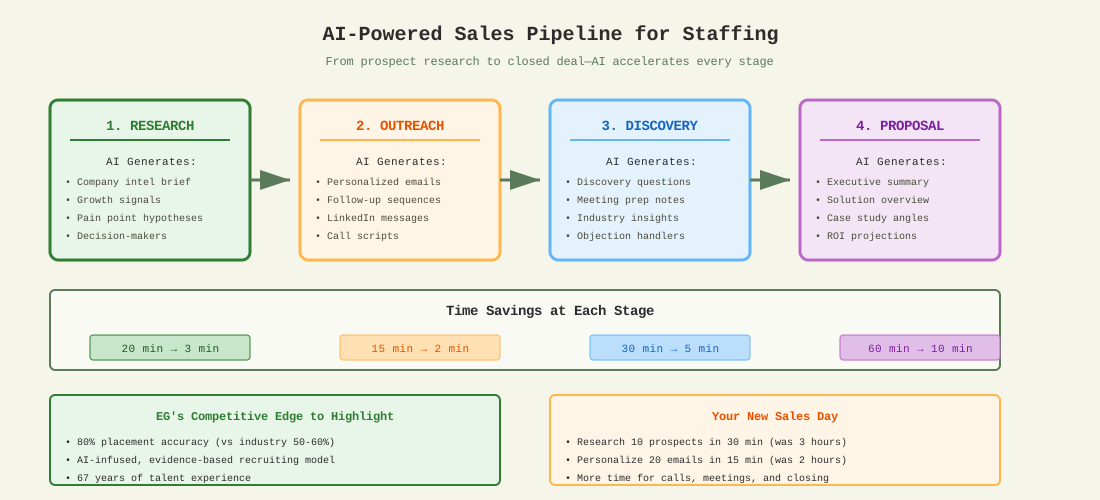
AI-powered sales pipeline for staffing

Prospect Research Prompt

"Research this company: [name/URL]. Tell me: 1) Industry and size, 2) Recent news or growth signals, 3) Likely staffing pain points, 4) Key decision-makers to target, 5) Three personalized openers for outreach. Keep each section under 50 words."

Outputs You'll Get

  • Company intelligence brief
  • Pain point hypotheses
  • Personalized email drafts
  • Follow-up sequences
  • Meeting prep notes
  • Proposal outlines
28-38 min (cont.)

Sales Outreach: Live Demo

Cold Outreach Email

"Act as a business development manager at EG Workforce Solutions. Write a cold outreach email to a [VP of HR] at a [mid-size manufacturing company] that recently announced expansion plans. Mention: 1) Our 80% placement accuracy, 2) A relevant case study hint, 3) Clear CTA for a brief call. 75 words max. Professional but warm tone."

Follow-Up Sequence

"Create a 3-email follow-up sequence for a prospect who hasn't responded. Each email should: 1) Add new value (insight, stat, or resource), 2) Reference previous touchpoint, 3) Have a soft CTA. Space them 5 days apart. 50 words each."

Proposal Draft

"Draft an executive summary for a staffing proposal. Client: [industry, size, challenge]. Include: 1) Understanding of their challenge, 2) Our recommended solution (RPO/Staffing/Executive Search), 3) Expected outcomes with metrics, 4) Next steps. 200 words. C-suite audience."
38-48 min

Recruiting & Talent Acquisition

AI for Candidate Quality

Job Description Builder

"Create a job description for a [role title] at a [company type]. Include: compelling intro, key responsibilities (5-7 bullets), must-have qualifications, nice-to-haves, what we offer, and inclusive language throughout. Make it attractive to passive candidates. 300 words."

Interview Question Generator

"Generate 10 behavioral interview questions for a [role title]. Include: 3 questions on technical skills, 3 on teamwork/culture fit, 2 on problem-solving, 2 on leadership potential. For each question, include what a strong answer should demonstrate."

Candidate Summary

"Based on this resume summary [paste anonymized details], create a candidate brief for the hiring manager. Include: 1) Key strengths aligned to the role, 2) Experience highlights, 3) Potential concerns or gaps, 4) Suggested interview focus areas. 150 words."
38-48 min (cont.)

Screening & Matching: Live Demo

Role-to-Candidate Match Analysis

"Compare this candidate profile [paste anonymized summary] against these job requirements [paste]. Score on: 1) Technical skills (0-10), 2) Experience level (0-10), 3) Industry match (0-10), 4) Location/availability (0-10). Output as a table with a final recommendation and rationale."

Rejection Email (Professional & Warm)

"Write a rejection email for a candidate who made it to final round but wasn't selected. Be warm, professional, and leave the door open for future roles. Mention: 1) Appreciation for their time, 2) Competition was strong, 3) Encourage them to stay in touch. 75 words."

Offer Letter Draft

"Draft an offer letter for [role title] with: salary [X], start date [Y], benefits summary, reporting structure, and next steps to accept. Professional, enthusiastic tone. Include a deadline for response. 200 words."
48-53 min

Personal Productivity

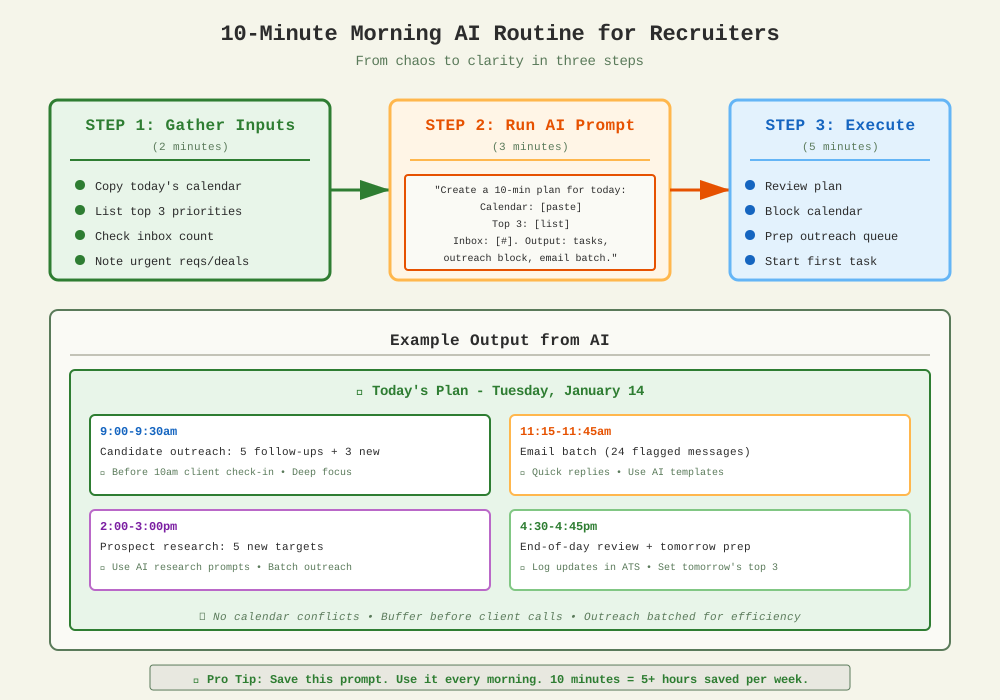
10-Minute Morning Routine

10-minute morning AI routine flow for recruiters

Transform morning chaos into a clear plan in just 10 minutes

48-53 min (cont.)

Meetings & Client Work

Client Discovery Questions

"Generate 5 discovery questions for a first meeting with a [VP of Operations] at a [manufacturing company] exploring staffing solutions. Focus on: current pain points, past staffing experiences, decision criteria, timeline, and budget indicators."

Meeting Notes → Action Plan

"From these meeting notes, create:
1) Recap paragraph (key discussion points)
2) Client needs and priorities
3) Dated next actions with owners
4) Follow-up items and timeline

[Paste raw notes]"

Handling Objections

Common objections: Cost, timing, "we handle recruiting internally", past bad experiences

"Draft a response to this objection: [paste]. Use the pattern: 1) validate their concern, 2) provide evidence or case study, 3) close with a clear next step. Keep under 100 words."
53-58 min

Hands-On Sprint

Apply What You've Learned

Exercise: Build Your Own Prompts

Use a real prospect, client, or role from your work. Create:

  1. A personalized outreach email for a prospect (120 words)
  2. Three discovery questions tailored to their industry
  3. A job description for a current open role

Apply the CRAFT Framework

Context: Include company details, your role, the recipient's role
Role: "Act as a [business development lead / recruiter / talent strategist]"
Action: "Draft outreach + discovery questions + job description"
Format: "120 words for email, 3 bullets for questions"
Tone: "Professional but warm, value-focused"

Remember: Anonymize candidate and client details. Use "a mid-size manufacturing company" instead of specific names.

58-60 min

The 5-Point AI Practitioner Checklist

1. Always include Context, Role, Action, Format, Tone
This is your baseline. Every prompt should have all five.
2. Ask the model to list missing info before drafting
"Before drafting, ask me for anything you need to know."
3. Constrain output length, structure, and audience
"Under 120 words, bullet format, for a hiring manager."
4. Require sources or "unknown"
"Cite sources for all market claims, or note 'unknown' if unavailable."
5. Iterate to a score target for your persona
"Rate this on clarity (0-10), professionalism (0-10), actionability (0-10). If under 8 on any, revise."

Print this checklist. Put it next to your monitor. Reference it every time you prompt.

Your Copy-Paste Prompt Library

Ready-to-use templates for staffing professionals

The next slides contain prompts you can copy and use immediately. Just replace the {bracketed} sections with your specific details.

How to Use These Prompts

  1. Copy the entire prompt
  2. Replace {bracketed text} with your details
  3. Paste into ChatGPT, Claude, or your preferred tool
  4. Review output, iterate if needed
  5. Save successful prompts for reuse

Remember: Always anonymize candidate and client information before pasting into any AI tool.

Prompt Library: Sales & BD

Prospect Research

"Research {company name/URL}. Provide: 1) Industry and size, 2) Recent news or growth signals, 3) Likely staffing pain points based on their industry, 4) Key decision-makers to target, 5) Three personalized openers for outreach. Under 50 words per section."

Cold Outreach Email

"Write a cold outreach email to a {title} at a {company type} that {recent trigger event}. Mention EG's 80% placement accuracy. Include a clear CTA for a brief call. 75 words max. Professional but warm tone."

Proposal Executive Summary

"Draft a proposal executive summary for {client type} facing {challenge}. Include: understanding of their challenge, recommended EG solution, expected outcomes with metrics, and next steps. 200 words. C-suite audience."

Follow-Up Sequence

"Create a 3-email follow-up sequence for a prospect who hasn't responded. Each email should add new value (insight, stat, or resource) and have a soft CTA. Space them 5 days apart. 50 words each."

Prompt Library: Recruiting

Job Description

"Create a job description for {role title} at a {company type}. Include: compelling intro, key responsibilities (5-7 bullets), must-have qualifications, nice-to-haves, what we offer. Use inclusive language. Make it attractive to passive candidates. 300 words."

Interview Questions

"Generate 10 behavioral interview questions for {role title}. Include: 3 on technical skills, 3 on teamwork/culture, 2 on problem-solving, 2 on leadership. For each, include what a strong answer demonstrates."

Candidate Brief

"Based on this anonymized resume summary {paste}, create a candidate brief. Include: key strengths aligned to the role, experience highlights, potential concerns, and suggested interview focus areas. 150 words."

Rejection Email

"Write a rejection email for a candidate who made it to {stage} but wasn't selected. Be warm, professional, and leave the door open for future roles. 75 words."

Prompt Library: Personal Productivity

Morning Planner

"Create a 10-minute plan for today using my calendar blocks {paste}, top three priorities {list}, and inbox count {number}. Output: 1) three tasks with timeboxes, 2) one email batch window, 3) one candidate outreach block."

Meeting Recap

"From these meeting notes {paste}, create: 1) recap paragraph, 2) client needs and priorities, 3) dated next actions with owners, 4) follow-up items and timeline."

Inbox Triage

"From these subject lines and snippets {paste}, group by action needed: 1) reply now (draft 3 short responses), 2) schedule for later, 3) delegate, 4) archive. Propose a 25-minute batch to clear group 1."

Weekly Review

"Review my week: placements made {#}, calls completed {#}, proposals sent {#}. Output: 1) three wins to celebrate, 2) two process improvements, 3) next week's top three priorities."

Tool Starter Pack & Next Steps

Recommended Tools

Core AI Tools
  • ChatGPT or Claude for drafting and reasoning
  • Perplexity for research with citations
Prospect Intelligence
  • LinkedIn Sales Navigator
  • Company websites and news
  • Industry reports
Recruiting
  • Your ATS (+ AI for summaries)
  • LinkedIn Recruiter
Meetings & Automation
  • Otter, Fathom for meeting notes
  • Zapier or Make for workflows

Your 10-Minute Daily Routine

  1. Morning (5 min): Run your planner prompt with calendar + priorities
  2. Midday (3 min): Triage inbox, draft quick responses
  3. Evening (2 min): Review action items, prep tomorrow's top 3

You now have the prompts, patterns, and practices to save 5+ hours per week.

Start with one prompt tomorrow. Build from there.

Appendix

Deeper Insights, Tools, and Advanced Strategies

• Before/After Time Audit

• Common Pitfalls and Fixes

• EG-Specific Use Cases

• AI and Your ATS

• Sales Intelligence Platform Vision

Appendix A1: Your Week Before & After AI
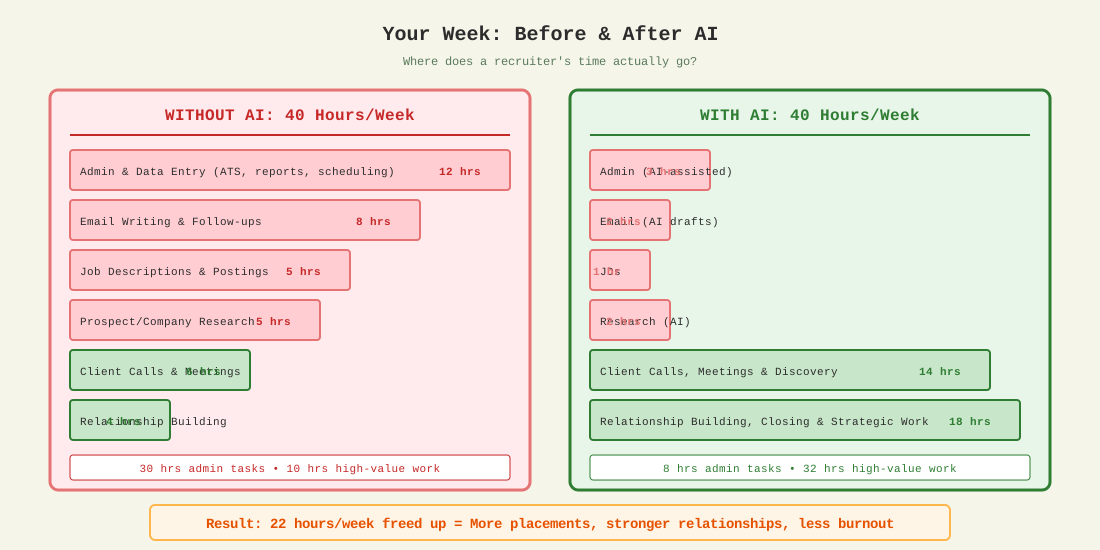
The Real Time Savings (Not Hypothetical)

Before and after time audit comparison for recruiters
Without AI
  • 30 hrs on admin tasks
  • 10 hrs on relationship building
  • Constant context switching
  • Exhausted by Wednesday
With AI
  • 8 hrs on admin (saved 22 hrs!)
  • 32 hrs on client & candidate relationships
  • Deep focus preserved
  • More placements, less burnout

ROI Calculation: If your time drives $500/placement and you save 22 hrs/week to make 2 more placements/month = $12,000/month additional revenue

Appendix A2: Common Pitfalls & How to Fix Them

Pitfall #1: Too Vague

❌ Doesn't Work
"Write an email to a prospect."
✓ Works
"Write a 75-word cold email to a VP of HR at a growing manufacturing company. Mention their recent expansion news. Pitch EG's RPO services. Include a CTA for a 15-min call."

Pitfall #2: Accepting First Output

Common mistake: "The AI gave me something mediocre, so AI doesn't work."

Reality: AI output is a starting point. Use "write then refine":

  1. Get initial draft
  2. Review and identify what's off
  3. Prompt: "Make it more [specific fix]"
  4. Iterate 2-3 times to perfection

Pitfall #3: No Quality Check

Always verify before using:

  • Salary claims → Verify with market data
  • Company facts → Check on their website
  • Candidate details → Never trust AI to remember accurately
  • Legal/compliance → Always have HR review

Appendix A3: EG-Specific Use Cases

RPO Pitch Development

"Create a pitch for EG's RPO services to a {industry} company with {size} employees facing {challenge}. Highlight: AI-infused recruiting model, 80% placement accuracy, reduced time-to-hire, and evidence-based assessments. Include a relevant case study angle. 200 words."

Executive Search Value Prop

"Draft talking points for an executive search engagement. Client is seeking a {role} for their {department}. Emphasize: beyond resumes and reputation, structured evaluation, proprietary assessment tools, and evidence of leadership capability. Bullet format."

Talent Strategy Consultation

"Create discovery questions for an EmBrand consultation. The client wants to improve their employer brand to attract {talent type}. Include questions about: current perception, competitor positioning, EVP gaps, and measurement goals. 8 questions."

Workplace Services Cross-Sell

"Write a brief email introducing EG Workplace Services to an existing staffing client. Mention: janitorial, sanitation, and business services. Position as 'let us handle the non-core functions so you can focus on what matters.' 100 words."

Appendix A4: AI and Your ATS

How AI fits with Bullhorn, JobDiva, Avionté, and other systems

What Your ATS Already Does
  • Resume parsing - Extracts candidate data automatically
  • Search/matching - Finds candidates by keywords
  • Workflow automation - Status updates, email triggers
  • Built-in AI features - Many ATS now include AI assist
What ChatGPT/Claude Add
  • Better writing - JDs, emails, proposals beyond templates
  • Research - Company intel your ATS can't provide
  • Analysis - Synthesize info across multiple sources
  • Creative tasks - Interview questions, objection handling

The Workflow: ATS + AI Together

1. Pull candidate/job data from your ATS

2. Paste anonymized details into ChatGPT/Claude for analysis or writing

3. Review and edit the AI output

4. Copy final content back into your ATS (notes, emails, etc.)

Important: Data Privacy

  • Never paste full candidate records with SSN, DOB, or contact info
  • Anonymize before pasting: "5-year recruiter in manufacturing" not "Jane Doe"
  • Check your ATS for built-in AI features—they may already have compliant solutions
  • Ask IT about enterprise AI tools with data protection (ChatGPT Enterprise, etc.)

Appendix A5: The Future - AI Sales Intelligence
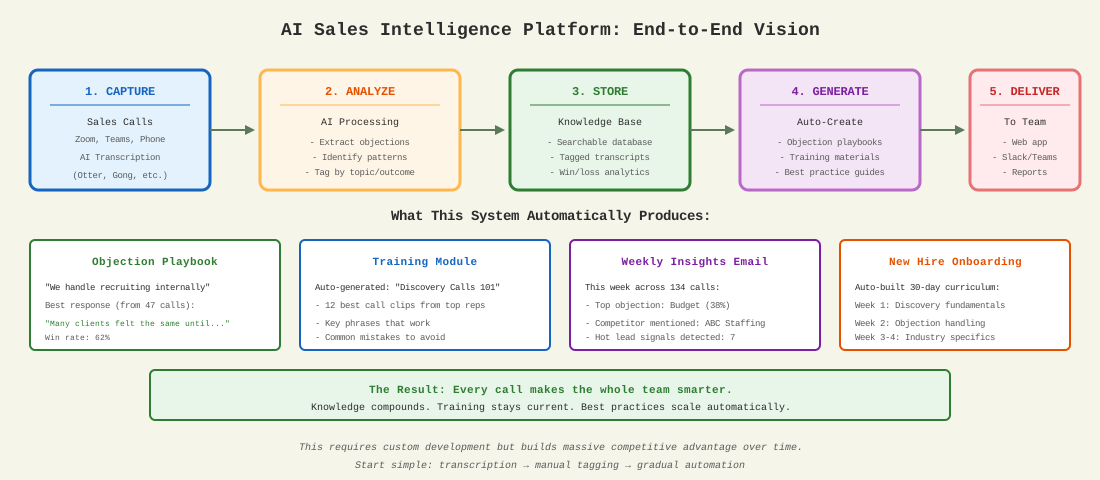
From call transcripts to automated training: A complete system

AI Sales Intelligence Platform architecture

Beyond Basic Transcription

Most teams stop at AI transcription. Here's what's possible with a custom internal platform:

Automated Analysis
  • Objection detection - AI identifies every objection raised across all calls
  • Win/loss patterns - What phrases correlate with closed deals?
  • Competitor mentions - Track what prospects say about alternatives
  • Sentiment tracking - Flag calls that need manager attention
Automated Outputs
  • Objection playbook - Auto-generated responses based on what works
  • Training library - Best call snippets tagged by skill/scenario
  • New hire curriculum - AI builds onboarding content from top performers
  • Weekly insights - Trends and coaching opportunities surfaced automatically

The Vision: Every sales call makes your entire team smarter. New hires learn from thousands of real conversations. Managers coach with data, not guesses. Your best reps' techniques scale across the organization.