AI for CRE and A&D
Prompting and Tools for Projects and Personal Productivity
60-Minute Interactive Workshop
by Joe Scanlin
Warm-Up: Why This Feels Different
The Autonomous Driving Analogy
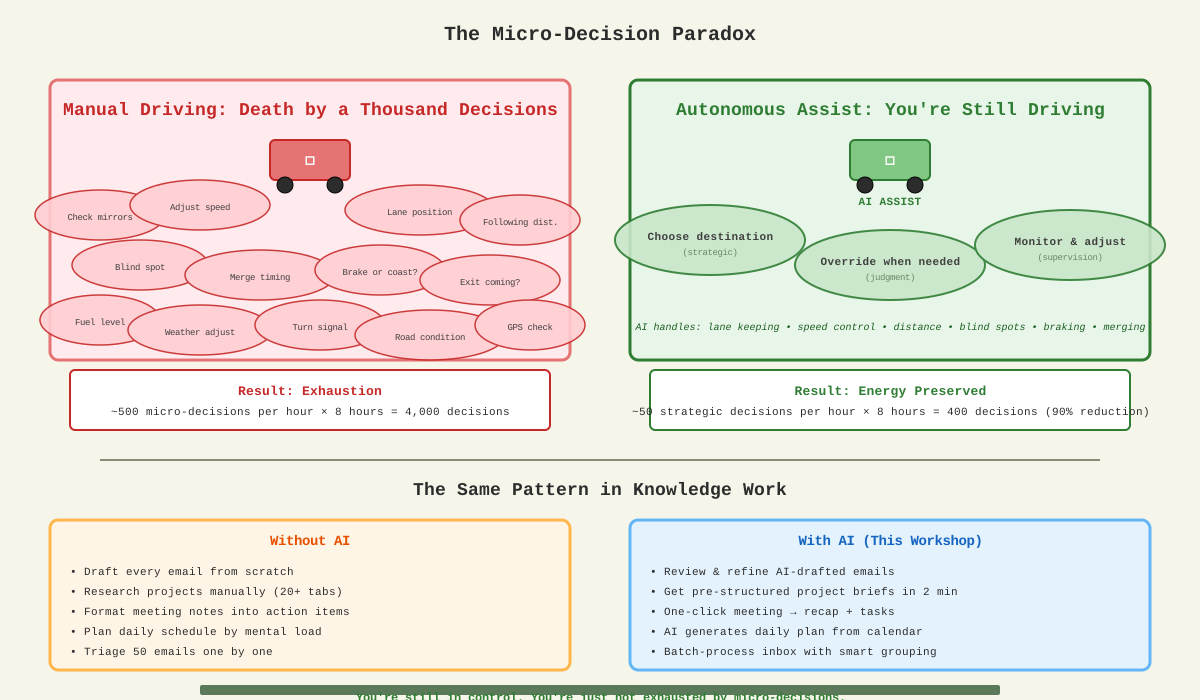
You're still driving. You're still making the important decisions.
You're just not exhausted by the micro-decisions anymore.
90% reduction in cognitive load = Energy preserved for strategic thinking
Kickoff and Outcomes
Why AI Now?
- AI has moved from experimental to essential for project teams
- Designers and client-facing roles gain 5-15 hours per week
- Shift from "nice to have" to competitive advantage
- Tools are production-ready, patterns are proven
Interactive Poll: Your Biggest Time Drains
- Research & intel gathering
- Proposal writing
- Spec drafting
- Meeting prep
- Email triage
- RFI responses
- Planning & coordination
- Documentation
By the end: You'll have prompts, patterns, and a daily routine that saves 5+ hours per week.
What to Use AI For (and Not For)
- Project work: Research, stakeholder mapping, pursuit strategy
- Documents: Proposals, specs, RFI triage, meeting notes
- Design prep: Charrette planning, discovery questions
- Personal: Daily planning, calendar/email triage, summaries
- Confidentiality: Never paste client-specific data
- IP: Don't share proprietary designs or methods
- Compliance: Always verify code requirements
- Citations: Require sources, check verifiability
Golden Rule
Separate client data from personal data. Anonymize project details before pasting.
Example: Instead of "The Apple headquarters renovation in Cupertino", use "A 500K sf corporate headquarters renovation in Northern California."
What's Actually Happening?
How Large Language Models Work (Simple Version)
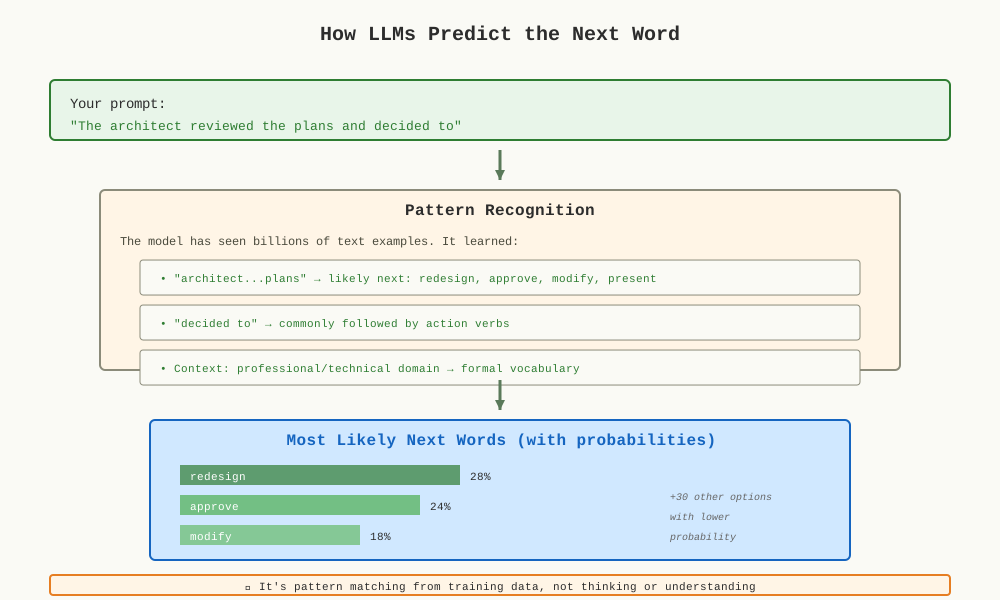
Think of it Like This
An LLM is like an incredibly well-read assistant who's seen billions of examples of text and learned what words tend to follow other words in different contexts.
- Finding patterns in language
- Completing sentences naturally
- Matching style and tone
- Following common structures
- Not "thinking" or "understanding"
- No actual knowledge or memory
- Can't access real-time data
- Doesn't fact-check itself
Key Takeaway: LLMs are prediction engines trained on patterns. That's why good prompts matter—you're giving it better context to make better predictions.
Prompting That Works
The CRAFT Framework
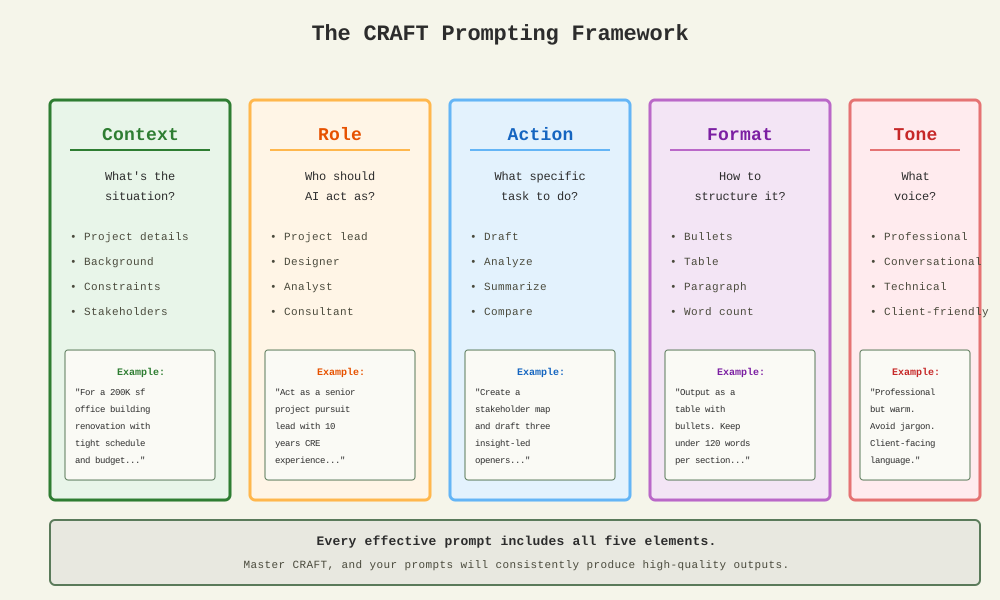
Every effective prompt includes Context, Role, Action, Format, and Tone
Example: Before CRAFT
After CRAFT
Proven Prompting Patterns
Pattern 1: Write Then Refine
Pattern 2: Three Options
Pattern 3: Request Missing Info First
Pattern 4: Compare A vs B
Guardrails for Quality
Always Add These Constraints
- Sources: "Include sources for all claims, or say 'unknown' if unavailable"
- Audience: "Write for a [facility manager / C-suite exec / design team]"
- Length: "Keep under [150 words / 3 bullets / 1 page]"
- Structure: "Use [bullets / table / paragraph] format"
Personal Task Self-Check
For calendar planning and inbox responses, add this line:
Example with Guardrails
Project Research & Pursuit Strategy
Live Demo Walkthrough
Inputs You'll Use
- Project name or address (anonymized if needed)
- Firm websites and LinkedIn profiles
- Public news articles or press releases
- Award lists or similar case studies
Outputs You'll Get
- One-paragraph project brief
- Stakeholder map with priorities
- Three insight-led openers
- 75-word outreach email
- Timeline bullets
- Risk flags
"Act as a project pursuit lead. Using the project info below, produce: 1) scope and drivers (3 bullets), 2) stakeholders and likely priorities (table: name, role, goal, preferred evidence), 3) three insight-led openers for outreach, 4) a 75-word email, 5) timeline and risk bullets. Keep it under 120 words per section.
[Paste anonymized project details]"
Personal Productivity Add
10-Minute Morning Routine
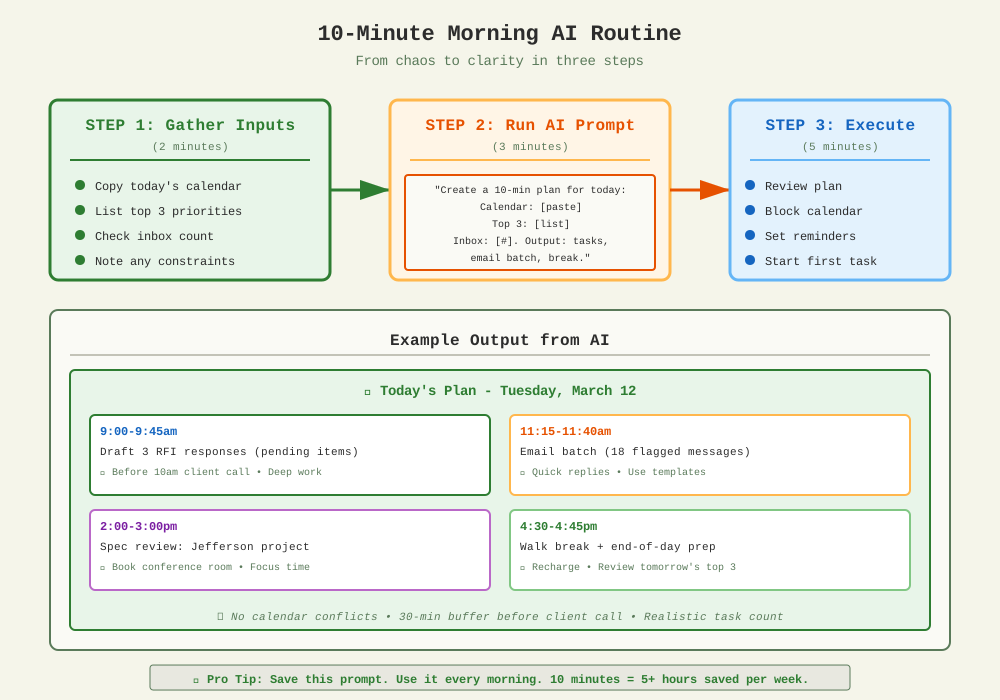
Transform morning chaos into a clear plan in just 10 minutes
Meetings, Charrettes, and Objections
Discovery Questions by Discipline
Meeting Notes → Action Plan
1) Recap paragraph (what was decided)
2) Decision criteria (what matters most)
3) Dated next actions with owners
4) Open risks or dependencies
[Paste raw notes or transcript]"
Handling Objections: Validate + Evidence + Close
Common objections: Budget, schedule, code/certification, maintenance cost, product availability
Personal Add: One-Click Follow-Up
The Problem
Meeting ends. You have notes. You need to send a recap, create tasks, and schedule follow-ups. It takes 20 minutes you don't have.
The Solution: Follow-Up Routine
1) Email recap for attendees (100 words, include decisions and next steps)
2) Task list with owners and due dates
3) Calendar items I should schedule
[Paste notes]"
Example: Meeting on HVAC System Selection
"Discussed two HVAC options. Team leaning toward VRF for flexibility. Budget concern: $80k delta. FM worried about maintenance training. Need vendor quotes by Friday. Code review needed."
Email: "We're moving forward with VRF system pending vendor quotes (due Fri). Budget delta $80k—exploring value engineering. FM training plan needed."
Tasks: Request quotes (Sarah, Fri), code review (Tom, Wed), training plan (Lisa, Mon)
Discipline-Specific Plays
Architect and Designer
- Tech sheet → Client one-pager: "Convert this technical sheet into a client-facing summary: Problem, Why this option, Performance/code notes, Install overview, Maintenance, Next step. Bullets only."
- Spec language: "Draft spec language for [product/system] using MasterSpec format. Include performance criteria, installation requirements, and acceptance testing."
- Value engineering: "List three VE alternatives for [space/product]. Compare: cost, schedule, performance, maintenance. End with recommendation and risks."
Owner and Facilities Manager
- Lifecycle cost: "Build a TCO comparison for [two options]. Include material, install, maintenance, replacement interval (20 years), and rationale. Table format."
- Risk register: "From this project scope, create a risk register: risk description, likelihood (L/M/H), impact (L/M/H), mitigation strategy, owner."
- Change log: "Summarize these change orders into a table: ID, description, cost impact, schedule impact, approval status, reason."
Contractor and Rep
- Bid summary: "Summarize these bids into a comparison table: bidder, total cost, key inclusions/exclusions, timeline, payment terms, concerns."
- RFI triage: "Summarize these RFIs: ID, topic, owner, due date, dependencies. Flag code or certification risks."
- Install sequencing: "Create install sequence notes for [system]. Include: prerequisites, duration, crew size, coordination with other trades, inspection points."
Personal Productivity Templates
Weekly Review
• Completed: [list of completed tasks]
• Carried over: [incomplete items]
• Meetings: [hours in meetings this week]
Output: 1) Three wins to celebrate, 2) Two process improvements, 3) Next week's top three priorities."
Timeboxing Assistant
Inbox Zero Lite
Hands-On Sprint
Apply What You've Learned
Exercise: Build Your Own Prompts
Use a real project or task from your work. Create:
- A 120-word personalized outreach email for a project
- Three discovery questions tailored to your stakeholder
- A compelling subject line (under 60 characters)
Apply the CRAFT Framework
Remember: Anonymize client details. Use "a 200K sf office building" instead of specific names or addresses.
Pair and Share
Share your prompt and output with a partner. Give feedback on: clarity, specificity, guardrails, and whether it solves the right problem.
Personal Sprint: Morning Planner
Build Your Two-Line Morning Prompt
Create a reusable prompt you can use tomorrow morning (and every morning after).
Template
Customize It
Add constraints that match your work style:
- "I work best on deep tasks in the morning, meetings in the afternoon"
- "Block 30 minutes before any client call for prep"
- "I need a walk break by 2pm or I lose focus"
- "Batch all email/admin work, don't scatter it"
Pro tip: Save this prompt in a note or doc titled "Morning Routine." Just copy, paste your calendar, and run it daily.
The 5-Point AI Practitioner Checklist
This is your baseline. Every prompt should have all five.
"Before drafting, ask me for anything you need to know."
"Under 120 words, bullet format, for a facility director."
"Cite sources for all claims, or note 'unknown' if unavailable."
"Rate this on clarity (0-10), professionalism (0-10), actionability (0-10). If under 8 on any, revise."
Print this checklist. Put it next to your monitor. Reference it every time you prompt.
Your Copy-Paste Prompt Library
Ready-to-use templates for common tasks
The next slides contain 10 prompts you can copy and use immediately. Just replace the {bracketed} sections with your specific details.
How to Use These Prompts
- Copy the entire prompt
- Replace {bracketed text} with your details
- Paste into ChatGPT, Claude, or your preferred tool
- Review output, iterate if needed
- Save successful prompts for reuse
Remember: Always anonymize client-specific information before pasting into any AI tool.
Prompt Library: Project Work
Project Brief Builder
Stakeholder Map
Proposal Executive Summary
Meeting Recap to Action Plan
Prompt Library: Technical Work
Spec Assist
Value Engineering Alternatives
RFI Triage
Lifecycle Cost Snapshot
Prompt Library: Personal Productivity
Personal Planner (Morning Routine)
Inbox Triage Helper
Weekly Review
Timeboxing Assistant
Tool Starter Pack & Next Steps
Recommended Tools
- ChatGPT or Claude for drafting and reasoning
- Perplexity for research with citations
- Firm and project websites
- Award databases
- News and press releases
- MasterSpec or SpecLink
- ARCAT, BIMobject, BIMsmith for cut sheets
- Otter, Fathom, Gong for notes
- Zapier or Make for workflows
Your 10-Minute Daily Routine
- Morning (5 min): Run your planner prompt with calendar + priorities
- Midday (3 min): Triage inbox, draft quick responses
- Evening (2 min): Review action items, prep tomorrow's top 3
You now have the prompts, patterns, and practices to save 5+ hours per week.
Start with one prompt tomorrow. Build from there.
→ Continue to Appendix for deeper insights and tools
Appendix
Deeper Insights, Tools, and Advanced Strategies
• Before/After Time Audit
• Common Pitfalls & Fixes
• Tool Selection Matrix
• 4-Week Adoption Roadmap
• Client-Facing Output Examples
• Integration with Your Tech Stack
• The 2-Minute Wins
• Error Recovery Patterns
• Team Adoption Playbook
Appendix A1: Your Week Before & After AI
The Real Time Savings (Not Hypothetical)
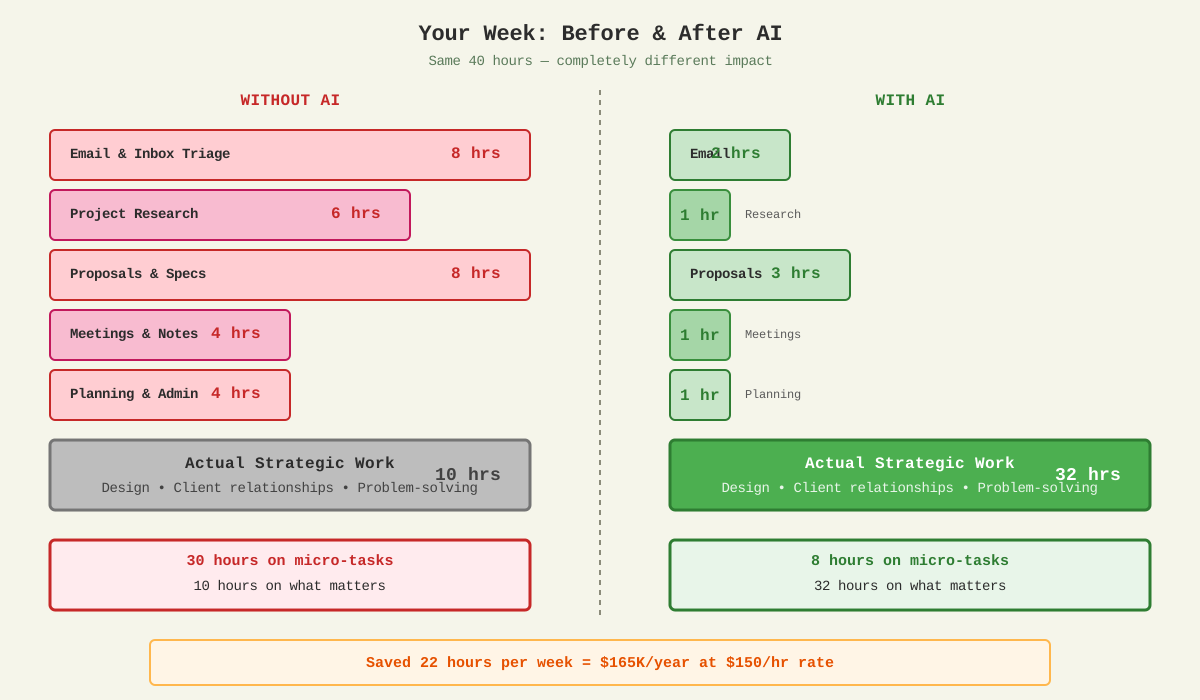
- 30 hrs on micro-tasks
- 10 hrs on strategic work
- Constant context switching
- Exhausted by Wednesday
- 8 hrs on micro-tasks (saved 22 hrs!)
- 32 hrs on strategic work
- Deep focus preserved
- Ahead of schedule
ROI Calculation: If your billable rate is $150/hr, saving 22 hours/week = $3,300/week or $165K/year in recovered time
Appendix A2: Common Pitfalls & How to Fix Them
Why your prompts aren't working (and what to do)
Pitfall #1: Too Vague
Fix: Add Context, Role, Action, Format, Tone (CRAFT)
Pitfall #2: No Constraints
Result: 300-word essay, wrong tone, generic
Result: Concise, appropriate, actionable
Fix: Specify length, audience, structure, tone
Pitfall #3: Accepting First Output
Common mistake: "The AI gave me something mediocre, so AI doesn't work."
Reality: AI output is a starting point. Use "write then refine" pattern:
- Get initial draft
- Review and identify what's off
- Prompt: "Make it more [specific fix]"
- Iterate 2-3 times to perfection
Pitfall #4: No Quality Check
Always verify before using:
- Are there factual claims? → Ask for sources
- Is it client-facing? → Check tone and accuracy
- Are there numbers? → Verify calculations
- Code compliance mentioned? → Double-check with official sources
Remember: AI assists, you approve.
Appendix A3: Which AI Tool for Which Task?
Decision Matrix for CRE & A&D Work
| Task Type | Best Tool | Why This Tool | Time Saved |
|---|---|---|---|
| Quick drafts (email, summaries) |
ChatGPT or Claude | Fast, conversational, handles ambiguity well | 80% |
| Research with sources (codes, case studies) |
Perplexity | Includes citations, web search integrated | 90% |
| Long documents (proposals, specs) |
Claude | 200K token context, handles large inputs | 75% |
| Meeting transcripts (notes → action items) |
Otter.ai + ChatGPT | Otter captures audio, ChatGPT structures output | 85% |
| Technical specs (product data) |
ChatGPT + ARCAT | ARCAT for data, ChatGPT to format client-facing | 70% |
| Image generation (concept boards) |
DALL-E or Midjourney | Purpose-built for visual content | Variable |
| Workflow automation (email → CRM) |
Zapier or Make | Connects AI outputs to your existing tools | 95% |
Quick Selection Guide
- Need it fast + conversational? → ChatGPT
- Need citations/sources? → Perplexity
- Working with long documents? → Claude
- Want to automate repetitive tasks? → Zapier/Make
- Need meeting transcription? → Otter.ai or Fathom
Pro Tip: Most professionals use 2-3 tools regularly. Start with ChatGPT or Claude for 90% of tasks, add Perplexity for research. Don't overcomplicate.
Appendix A4: Your 4-Week Adoption Roadmap
Slow and steady wins the race
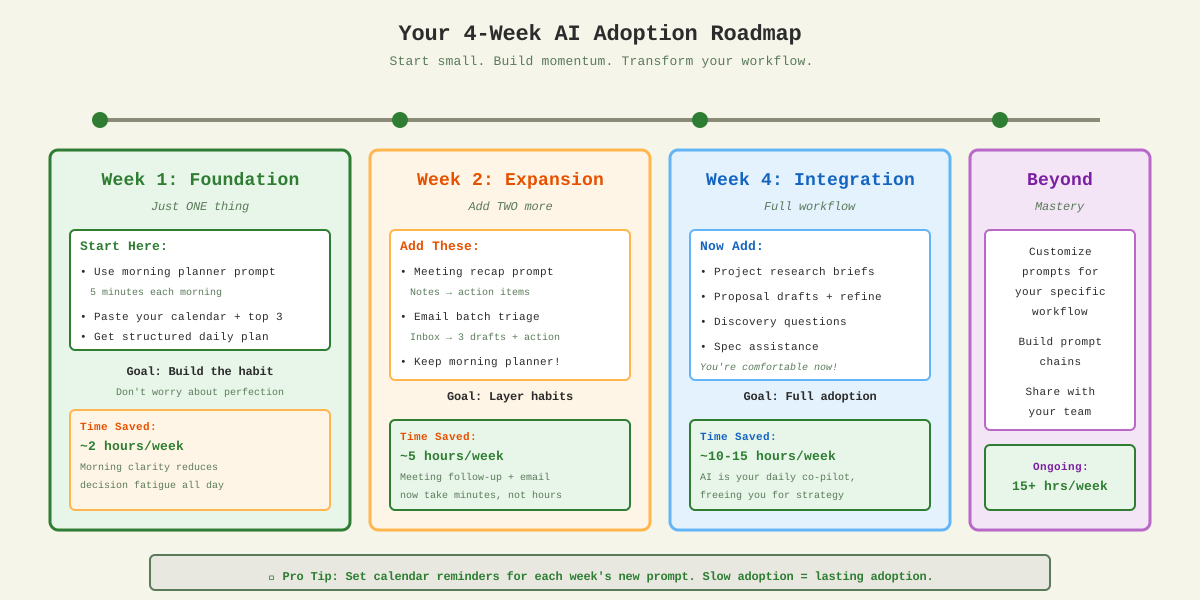
Why This Approach Works
- Week 1: Build one habit. Don't overwhelm yourself. Morning planner = foundation.
- Week 2: Layer on two more. You're comfortable with prompting now.
- Week 4: Full integration. AI is your daily co-pilot, not a novelty.
- Beyond: Customize and optimize for your specific workflow.
Common mistake: Trying to use AI for everything on Day 1.
Result: Overwhelm → giving up by Week 2.
Better approach: Start small, prove value to yourself, build momentum.
Set Yourself Up for Success
Appendix A5: Client-Facing Output Examples
Real AI outputs you can trust
Example 1: Stakeholder Map (Generated in 90 seconds)
| Stakeholder | Role | Priority | Evidence They Value |
|---|---|---|---|
| Sarah Chen | VP Facilities | Lifecycle cost, maintenance | TCO analysis, service contracts |
| Marcus Williams | CFO | Budget, ROI timeline | Financial models, payback period |
| Linda Park | Head of Design | Aesthetics, brand alignment | Renderings, material samples |
Prompt used: "Given [3 names and roles], infer decision influence for [200K sf renovation]. Output a table: stakeholder, priority, evidence."
Example 2: 75-Word Outreach Email (Generated in 45 seconds)
Hi Sarah,
I saw your team is evaluating HVAC options for Jefferson Tower. We've worked on three similar retrofits in the past year, each achieving 30%+ energy savings without major tenant disruption.
Would a 15-minute call next week make sense to share what worked? Happy to adjust to your schedule.
Best,
[Your Name]
Prompt used: "Draft a 75-word outreach for a facilities VP about an HVAC project. Insight-led opener, warm professional tone, clear next step."
Example 3: Meeting Recap (Generated in 2 minutes)
HVAC Selection Meeting – Jan 15, 2025
Decision Made:
Move forward with VRF system for flexibility. Budget delta ($80K) approved pending value engineering review.
Next Actions:
- Sarah: Request vendor quotes by Friday (1/19)
- Tom: Code compliance review by Wednesday (1/17)
- Lisa: Draft FM training plan by Monday (1/22)
Open Risks:
Lead time for equipment could affect Q2 timeline. Vendor quotes will clarify.
Prompt used: "From these notes, create: 1) decision paragraph, 2) next actions with owners/dates, 3) open risks."
Notice the quality level: These outputs are ready to send (with minor review).
Not "AI slop" — professional, specific, actionable.
This is what's possible when you use CRAFT prompting.
Appendix A6: Integration with Your Tech Stack
How AI fits into your existing workflow
The Integration Pattern
Teams, Slack
Perplexity
PM Tools
Common Integration Workflows
- Copy email thread
- Paste into ChatGPT with prompt: "Extract action items with owners and due dates"
- Copy output to Asana/Monday/Trello
Advanced: Use Zapier to automate steps 2-3
- Record with Otter.ai or Fathom
- Export transcript to ChatGPT
- Prompt: "Create recap email"
- Review, refine, send from Outlook
Time saved: 20 min → 3 min
- Gather project info (website, news)
- Paste into Perplexity for research
- Feed output to Claude: "Draft proposal executive summary"
- Export to Word, format, finalize
Time saved: 2 hrs → 20 min
- Copy calendar for today
- Paste into ChatGPT with morning planner prompt
- Get timeboxed plan with tasks
- Set reminders or block calendar
Time saved: 15 min → 2 min
Automation Options (Advanced)
Once you're comfortable with manual AI workflows, consider automating repetitive tasks:
- Zapier: Connect Gmail → ChatGPT API → Google Sheets for automatic email triage
- Make (formerly Integromat): More complex workflows, visual automation builder
- Native integrations: Otter.ai → Slack, Fathom → CRM, ChatGPT → Notion
Start here: Master manual prompting first (Weeks 1-4). Then add automation where it makes sense.
Important: You don't need automation to save 10+ hours/week. Manual copy-paste workflows are fast and flexible. Automation is a bonus, not a requirement.
Appendix A7: The 2-Minute Wins
Quickest impact prompts you can try right now
Perfect for: On your phone during a break, between meetings, waiting for a call to start
Each takes ~2 minutes to execute and delivers immediate value
Win #1: Smart Subject Lines (30 seconds)
Use case: Boost open rates on client emails
Win #2: Meeting Agenda Generator (90 seconds)
Use case: Run more focused meetings with clear outcomes
Win #3: Instant Meeting Prep (2 minutes)
Use case: Walk into meetings confident and prepared
Win #4: Email Tone Checker (45 seconds)
Use case: Catch tone problems before you hit send
Win #5: LinkedIn Connection Note (60 seconds)
Use case: Network more effectively without sounding generic
🎯 Challenge: Try one of these TODAY. Pick the lowest-friction option and just do it.
Once you experience the speed, you'll be hooked.
Appendix A8: Error Recovery Patterns
What to do when AI gets it wrong
Reality check: AI will make mistakes. It will hallucinate facts, miss nuance, and occasionally produce garbage. The difference between novices and pros isn't avoiding errors—it's recovering from them quickly.
Pattern #1: The Factual Hallucination
AI confidently states: "Building code requires X" but you know that's wrong.
Lesson: Always ask for sources on factual claims. AI often admits uncertainty when pressed.
Pattern #2: Wrong Tone / Style
Output is too formal, too casual, or uses jargon your audience won't understand.
Lesson: Be specific about what's wrong. "Make it better" doesn't work. "Make it 30% more conversational" does.
Pattern #3: Missing Context
AI gives generic advice that doesn't account for your specific constraints.
Lesson: AI can't read your mind. If output is generic, you didn't provide enough context upfront.
Pattern #4: Structural Problems
Problem: Output is organized wrong—bullets should be a table, paragraph should be bullets, etc.
"Reformat this as a [table / bulleted list / numbered steps / paragraph]. Columns should be: [specify]. Keep content identical, just change structure."
Lesson: Specify format upfront in your CRAFT prompt to avoid this.
Pattern #5: Complete Garbage Output
When to start over:
- Output is 80%+ wrong or irrelevant
- You've iterated 3+ times and it's still not close
- The AI fundamentally misunderstood your request
Solution: Start a new conversation. Sometimes the thread has too much confusing context. Rewrite your prompt with CRAFT, paste into fresh chat, and try again.
Appendix A9: Team Adoption Playbook
How to bring your team along (without forcing it)
The challenge: You're excited about AI, but your team is skeptical, overwhelmed, or worried about job security. How do you create momentum without mandating adoption?
Step 1: Lead with Your Own Results (Week 1-2)
- Use AI for your own work
- Track time saved (roughly)
- Share one win casually: "I used AI to draft that proposal in 20 minutes"
- Don't evangelize—just demo results
- Shows > tells
- Reduces skepticism with proof
- Makes it safe to ask questions
- Creates curiosity, not pressure
Step 2: Offer to Help One Person (Week 3)
"Hey Sarah, I know you're swamped with RFI responses. Want me to show you a 5-minute AI trick that could cut that time in half? No pressure—just thought it might help."
Key: Offer help, don't mandate adoption. Find their pain point (meetings, emails, proposals) and solve it together.
Step 3: Share a Starter Prompt Library (Week 4)
Create a shared doc with 5-7 prompts:
- Morning planner prompt (personalizable)
- Meeting recap → action items
- Email triage batch
- Proposal executive summary
- Quick subject line generator
Label each: "Saves ~X minutes" and "Best for [role/task]". Make it copy-paste ready.
Step 4: Address Concerns Head-On
- "AI will replace my job"
- "I don't have time to learn this"
- "AI makes mistakes"
- "Clients will know it's AI"
- "AI assists, it doesn't replace judgment"
- "Start with one 5-min prompt per day"
- "That's why we review before sending"
- "With CRAFT prompting, quality is professional"
Step 5: Propose a Team Pilot (Month 2)
Pitch to leadership:
Include: Clear success metrics (hours saved, tasks accelerated), opt-in only, share learnings at the end.
✓ DO
- Lead by example first
- Share wins, not hype
- Offer help, not mandates
- Start with pain points
- Track and report results
✗ DON'T
- Force adoption top-down
- Overpromise ("AI solves everything!")
- Skip training/support
- Ignore legitimate concerns
- Expect instant buy-in
Bottom line: Adoption spreads organically when people see results, not when they're told to change.
Your job is to make the first step easy, safe, and valuable.